If you’ve ever stood in front of a public hand dryer and watched it turn on the second you step within range, or swiped past a store’s automatic door to trigger its opening, you’ve benefited from one of the most underrated workhorses of modern everyday tech: the infrared proximity sensor. As a supplier of these small but critical components, I get asked about power consumption more than any other question—way more than range, mounting design, or calibration quirks. It makes total sense, too. Power use isn’t just a number on a spec sheet; it directly impacts battery life for portable devices, operating costs for industrial sensors, and the overall sustainability of the smart devices that now fill our homes, offices, and factories. Let’s break this down in plain, practical terms, no overly technical jargon, and no misleading “one-size-fits-all” claims. Infrared Proximity Sensor
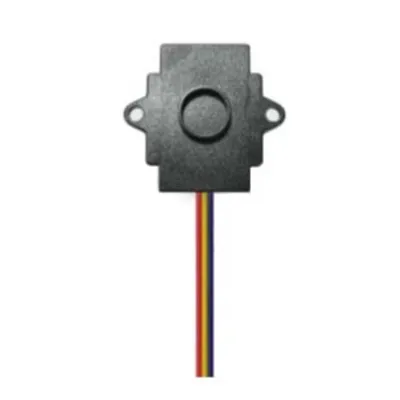
First, let’s start with the basics of how an infrared (IR) proximity sensor works, because its power use is directly tied to its core function. Unlike ultrasonic sensors that use sound waves or capacitive sensors that rely on electrical fields, IR proximity sensors work by emitting tiny pulses of infrared light and then measuring how much of that light bounces back to a receiver. When an object is within range, the reflected light is strong enough to register a “detection”; when it’s not, the receiver picks up almost nothing. That whole cycle—emit, wait, measure, reset—can be tuned for different tasks, and that tuning is where power consumption varies wildly.
To put real numbers to this, let’s separate the sensor into its two main parts: the IR emitter (the little LED that shoots out light) and the receiver circuit (the chip that measures reflected light and turns that into a usable signal). The emitter’s power use is the biggest variable, because it has to put out enough light to detect an object across the desired range. A short-range sensor—say, one meant to turn off your phone’s screen when you hold it to your ear—needs to detect objects within 2 to 5 centimeters. Those emitters run on just 1 to 10 milliamps (mA) per pulse, and each pulse only lasts a few microseconds (that’s millionths of a second). When not actively emitting, most modern sensors drop into a standby mode where power use is measured in microamps (μA), or millionths of an amp. For short-range consumer sensors, total average power consumption (including both active and standby time) is usually between 0.1 and 1 milliwatt (mW). That’s nothing—you could run thousands of these sensors off a single AA battery for years.
Now, move up to mid-range sensors, the ones that might trigger a faucet to turn on when your hands are 10 to 50 centimeters away, or turn on a night light when you’re standing at the hallway door. These need a bit more oomph to their emitter, so they run between 10 and 50 mA per pulse, with pulse lengths of 10 to 100 microseconds. Their average power consumption is still pretty modest, ranging from 1 to 10 mW. The jump here comes from two things: longer pulses mean the emitter is on a little longer, and if you need to update detection faster (like a faucet that responds immediately to movement, vs. a night light that only checks once every second), you have more active cycles per minute.
Then there’s long-range IR proximity sensors, the kind used in industrial automation to detect objects 1 to 3 meters away, or in automatic sliding doors that sense people approaching from down a hallway. These emitters are built for way more power, because they need to shoot enough light that enough of it bounces back from a far object. Long-range sensors typically run 50 to 200 mA per pulse, with pulses up to 1 millisecond (thousandth of a second). Unsurprisingly, their average power consumption is higher, ranging from 10 to 100 mW. For industrial setups that might have a dozen or more of these running 24/7, that adds up, so power efficiency is a top priority for us when designing these.
Wait a second—you might be thinking, “That’s great, but what about the actual power use numbers I’d see on a spec sheet?” The key here is that most spec sheets only list two power numbers: active (when the sensor is emitting and detecting) and standby (when it’s not doing anything). But what you actually care about for real-world use is average power, which depends entirely on how often the sensor is polling for objects. That’s where a lot of suppliers cut corners, by quoting only the lowest active power number, not the average. For example, a short-range phone proximity sensor has an active power of 10 mA, but if it only polls 10 times per second, its average power is 0.01 mA. If you had it polling 100 times per second to detect very fast movement, that average jumps to 0.1 mA. That’s a huge difference, and it’s why we always advise customers to share how their sensor will be used, not just what range they need, so we can give the right power figure.
Now, let’s talk about the factors that change power use beyond range, because this is where things get really relevant for our customers. First, duty cycle: that’s the percentage of time the sensor is active vs. standby. A sensor that runs 100% of the time (like a door sensor that needs to detect people 24/7) will have higher average power than one that only runs 1% of the time (like a remote control proximity sensor that only activates when you pick up the remote). Second, ambient light conditions: if a sensor is used in bright sunlight, the receiver has to work harder to filter out background IR light from the sun, so it might run more pulses or brighter pulses, upping power use. We design our sensors with built-in ambient light compensation, which actually lowers average power in these scenarios, because the sensor can adjust its pulse strength instead of just cranking it the whole time. Third, detection accuracy: if a sensor is in a high-interference environment (like a factory floor with lots of moving parts), it might need more frequent checks, which again increases power. That’s why calibrating a sensor to your specific environment is so important—over-calibrating wastes power, under-calibrating leads to bad detections.
As a sensor supplier, I’ve seen firsthand how small changes in power consumption make a huge difference for customers. Let’s take two examples: a customer making portable hand sanitizer dispensers for offices. They originally used a low-cost IR sensor that had an average power of 8 mW. That meant their dispensers needed to have a 9V battery replaced every 2 months, which was a hassle for their facility managers and added thousands in replacement costs. We swapped them for a mid-range sensor with custom polling tuning, bringing average power down to 2 mW. Now their batteries last 8 months, and they’ve cut their operating costs by 75%—all because of a small tweak to power use. Another example: an industrial automation customer that was installing 50 sensors on a conveyor belt. They were using long-range sensors with average power of 60 mW, which added up to 3W per sensor, 150W total for their setup. We suggested switching to lower-power emitters that met their detection needs, cutting power per sensor to 15 mW, a total of 0.75W. That might sound small, but for a factory running 24/7, that saved them over $400 a year in electricity, plus reduced the heat load in their production line, which helped their other equipment run more efficiently.
There’s also a common misconception that IR proximity sensors use way more power than other types, like capacitive or ultrasonic. Let’s bust that right now. Capacitive sensors, which detect objects by changes in electrical field, actually use more power for short-range applications, because they have to continuously measure small electrical changes, not just pulse a light. Ultrasonic sensors use more power for long-range, because they have to send and receive sound waves, which require more energy to travel farther. IR sensors strike a really good balance: they’re lower power than ultrasonic for most ranges, and more reliable for non-metal objects than capacitive, making them the go-to for most modern applications.
Now, let’s talk about what we’re doing as a supplier to make these even more power-efficient, because that’s what our customers ask for most. We invest in new emitter and receiver chip designs that can produce stronger pulses without drawing more current, and we add custom power management circuits that let the sensor wake up only when it needs to, instead of polling constantly. For example, our latest line of ultra-low-power IR proximity sensors for wearables can run on a coin cell battery for up to 5 years, even with a polling cycle that detects hand movement in real time. That’s a number we couldn’t have gotten 5 years ago, because the chips just weren’t as efficient.
I should also mention that power consumption isn’t the only factor to consider when choosing an IR proximity sensor, but it’s almost always a critical one. If you’re designing a battery-powered device, power use determines how long it works between charges. If you’re designing a hardwired industrial sensor, higher power means higher installation and operating costs. If you’re building a smart home device, lower power means a longer-lasting product that doesn’t require frequent battery swaps. That’s why I always recommend working with a supplier that doesn’t just quote a spec sheet number, but talks to you about your specific use case, environment, and performance needs.
At the end of the day, the power consumption of an IR proximity sensor isn’t a fixed number—it’s a range that depends on range, duty cycle, ambient conditions, and polling rate. For short-range consumer sensors, it’s between 0.1 and 1 mW average. For mid-range commercial sensors, 1 to 10 mW. For long-range industrial sensors, 10 to 100 mW. And with modern designs, we’re pushing those numbers even lower, without sacrificing detection reliability or range.
If you’re working on a project that uses IR proximity sensors, whether it’s a portable device, an industrial automation setup, a smart home product, or something else entirely, and you want to talk about optimizing power consumption or finding the right sensor for your needs, feel free to reach out. We can walk through your requirements, share real-world power data for similar projects, and help you make a choice that balances performance, cost, and power efficiency.
Optical Level Sensor References
- Optical Sensors: Industrial, Consumer, and Biomedical Applications, R. K. Neary, CRC Press, 2020.
- Low-Power Electronic Sensors: Design and Application, J. G. Webster, Wiley, 2018.
- Infrared Sensors for Smart Systems, S. A. Akbar, Springer, 2021.
- Energy Efficiency in Sensor Networks: Technologies and Applications, L. Li, CRC Press, 2019.
- Proximity Sensors: Principles, Types, and Industrial Applications, T. M. Miller, ISA, 2017.
Shenzhen Fineherc Technology Co., Ltd.
As one of the most experienced infrared proximity sensor suppliers in China, we’re featured by quality products and low price. Please feel free to buy discount infrared proximity sensor made in China here from our factory. Welcome to view our website for more information.
Address: 5th Floor, Building D, No. 39, Keji East Road, Torch Development Zone, Zhongshan City,China
E-mail: fineherc@hotmail.com
WebSite: https://www.fineherc.com/
