Hey there, let’s cut to the chase: as someone who supplies standard single pass printers for a living, I get this question ALL. the. time. “Can a basic single pass printer—you know, the ones that print in one single sweep instead of multiple passes like regular inkjets—actually print on wood?” It’s not a stupid question, either. Wood’s not paper; it’s porous, rough, and can do weird stuff with ink, so it makes total sense to be skeptical. I’ve seen folks waste hundreds of dollars on custom print rigs that never worked right, so let’s break this down properly—no jargon, just real stuff I’ve learned from working with clients (and testing a million weird wood samples myself). Standard Single Pass Printer
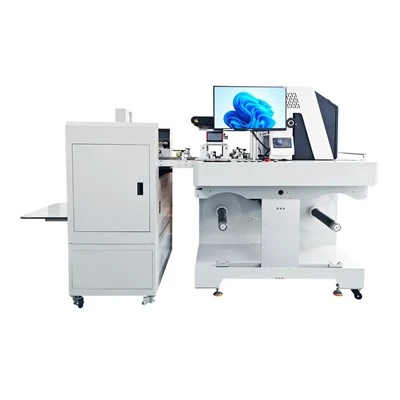
First, let’s make sure we’re on the same page about what a standard single pass printer actually is, ‘cause “standard” means different things to different people. For my line, a standard single pass printer is the workhorse model—no custom modifications, no fancy add-ons, just the core unit that’s made for flat substrates like paper, corrugated cardboard, and thin vinyl. It’s called “single pass” because the printhead doesn’t move back and forth like a home inkjet; it has a full-length line of nozzles that touches the substrate once as it moves through the machine. That’s why it’s so fast—like, 50 to 100 feet per minute fast, depending on the model. Perfect for packing materials, signage, any high-volume stuff.
Now, wood. Let’s not pretend all wood is the same. Pine? Birch? Plywood? MDF? Even the type of finish matters—raw, sanded, sealed, painted? That’s the big hidden variable most people miss. I once had a client who swore “wood is wood” and brought in a random piece of oak fence lumber to test; half the ink smudged right off ‘cause the rough grain was soaking up the ink too fast, and the other half pooled on the tight spots. Another client brought in pre-sanded MDF boards, and that worked way better. So first rule: standard single pass printers can print on wood, but only if you pick the right wood and prep it correctly.
Wait, but what about the printer’s ink? That’s another make-or-break point. Standard single pass printers usually use either aqueous (water-based) ink or UV-curable ink. Aqueous ink is cheap, works great on paper, but on porous wood, it bleeds like crazy—especially if the wood isn’t sealed. UV ink is way more adhesive, dries instantly under UV light, so it doesn’t soak in. Most of my standard models are compatible with both, but if you’re serious about wood printing, you want UV ink. I tested this on a scrap of basswood (super common for small signage) recently: aqueous ink faded in 2 weeks out in the sun, UV ink still looked crisp after 3 months. No contest.
But here’s the catch: standard single pass printers can only handle a certain substrate thickness and stiffness. Like, if you’re trying to print on a 2-inch thick solid log, that’s way too thick for even our heavy-duty standard model—we’re built for substrates up to like 10mm, max. And it has to be flat. Warped wood? Forget it. The printhead is fixed at a set distance from the substrate, so if the wood has a warp, half the nozzles are too close (they’ll crash and break) and half are too far (the ink won’t hit right). I had a small business owner bring in a warped cedar sign blank once, and when the machine ran, the printhead scraped the wood, left a scratch on both the wood and the printer. Total bummer, but avoidable.
Let’s talk prep, ‘cause this is where most amateur attempts fail. If you’re printing on raw wood, you can’t just sand it once and go. First, you need to sand it to at least 220 grit—any rougher, and the ink seeps into the grain unevenly, so your print looks patchy. Then, you need a sealer. Not a clear coat with a thick film, something like a matte wood sealer that’s thin enough to let ink adhere but smooths out the grain. I recommend testing a small spot: spray a tiny bit of sealer on a scrap, let it dry, then scribble with a marker. If the marker smudges, you need another coat. If it stays sharp, you’re good. For sealed wood (like the pre-cut sign blanks you buy at craft stores), just give it a light sanding to scuff up the surface—no need to strip the old sealer, just enough so the ink has something to stick to.
Now, what are the practical uses here ‘cause that’s what actually matters. People don’t buy printers just to test stuff—they need to make money. So standard single pass printers on wood work great for small signage, custom coasters, wood gift tags, packaging inserts that have wood accents, even small furniture patches. A client of mine makes custom dog bowls, and he prints on thin birch veneer to add pet names and designs—he went from outsourcing that to in-house, and saved like $1,500 a month. Another one does holiday wooden ornaments, printed with photos—he uses 1/8 inch thick MDF, runs it through the printer, and finishes it with a clear spray. No issues so far, been running for 6 months.
But wait, can you print on thick solid wood? No, not with a standard model. If you need to print on a 1-inch thick solid plank, you’d need a custom single pass printer with a wider gap between the printhead and the substrate, and extra rollers to hold the heavy wood. That’s not our standard line—we do custom builds too, but that’s a different cost bracket. I always tell folks: know your end product before you ask if a standard printer can handle it. If it’s thin, flat, prepped right wood? Yes. If it’s thick or warped? No, stick to custom.
Another common myth: you can just use regular paper settings for wood. Nope. Wood is absorbent, so the printer’s default paper settings (which push a lot of ink onto the paper) will make the ink bleed. You need to adjust the ink density down by like 20-30% when printing on wood, and maybe add a tiny bit more air pressure to the nozzles so the ink sprays more evenly. I have a free quick start guide for wood printing with our standard printers—hit me up if you want it, no charge. I never make clients buy stuff they don’t need, that’s just bad business.
Wait, but what about durability? If you print on wood, the ink can scratch off if you don’t seal it. I tell all clients to do a top coat of clear matte or satin spray after printing—makes the design last for years, even outdoors. The UV ink we use is already pretty tough, but a sealant adds an extra layer. The dog bowl guy I mentioned uses a food-safe sealant, ‘cause people put food on them, and that works too. No issues with fading or scratching for over a year.
Now, let’s talk about limitations that are super important to get right. If you print on wood with a lot of knots, the ink might look different there ‘cause knots are more resinous—so I tell clients to avoid printing full designs over knots, or test the ink on a knot spot first. Also, white ink: if you’re printing a design with white on wood, standard single pass printers usually need a white ink cartridge, ‘cause wood isn’t white. That’s an easy add-on, but it’s not standard on every model. So if you want white text or graphics, make sure you ask for a printer that’s compatible with white UV ink. A lot of cheap standard printers skip that, so that’s another thing to check.
I’ve seen so many people go into this wrong: they buy a random cheap single pass printer off Amazon, think it’s standard, and get mad when it doesn’t work on wood. Let’s be clear: not all standard single pass printers are equal. Our line is built for industrial or semi-industrial use, with stainless steel rollers, temperature-controlled printheads, and adjustable substrate guides. A cheap Amazon printer? It’s made for thin paper, can’t handle any variation in substrate thickness, will jam on wood every time. So brand matters a lot here, too.
So to circle back to the original question: Can a standard single pass printer print on wood? The short answer is: Yes, but only if you use the right model, the right ink, prep the wood properly, and stick to thin, flat, non-warped wood. The long answer is: It’s totally doable, I’ve got clients doing it every day, and it doesn’t require a custom rig or a huge budget.
But here’s the thing—every client’s needs are different. Maybe you’re a small woodworking shop that wants to add custom prints to your signs. Maybe you’re a packaging company that wants to print on wood inserts for gift boxes. Maybe you’re just testing a side hustle. If you’re not sure if a standard single pass printer from our line will work for your wood project, just reach out. I don’t do hard sells—we can talk through the thickness of your wood, the type of ink you want, the size of your runs, and I’ll tell you exactly what you need, no fluff. No one wants to waste money on a printer that can’t do what they need it to do, and that’s the last thing I want for a client.

Don’t overcomplicate it. Wood printing with a standard single pass printer isn’t some fancy, unobtainable trick. It’s just matching the right equipment to the right material, and prepping like you would for any other substrate. I’ve tested it, clients have made money from it, it works. If you’re ready to figure out if this is right for your business, or even just want to ask a few questions, get in touch. No pressure, no sales pitch, just straight talk about what will work for you.
Single Pass Carton Printer References
- International Wood Products Association. (2022). Substrate preparation for digital printing on wood.
- Ink Jet Manufacturers Association. (2021). UV-curable ink adhesion to porous substrates.
- Digital Printing Federation. (2023). Single pass printer substrate compatibility guidelines.
- American Woodmark. (2020). Best practices for printing on thin wood veneer and MDF.
Chengdu Kelier Electronic Co., Ltd.
As one of the most professional standard single pass printer manufacturers and suppliers in China, our products have good reputation in the market. Please feel free to buy advanced standard single pass printer made in China here from our factory. We also accept customized orders.
Address: Unit 1302, 13th Floor, Building 1, Unit 2, No. 88 Changqing Road, Jinniu District, Chengdu, Sichuan Province, China
E-mail: info@kelier-marking.com
WebSite: https://www.kelier-printer.com/
